


GPS Tracker & Location Tracker
4.4163.00 Reviews
App Specs
- Version
- 1.2.3
- Updated On
- License
- Free
- Downloads
- 1,000,000+
- Developer
- NAICOO PTE. LTD.
- Categories
- Maps & Navigation
- Platform
- Android
Screenshots
 Analysis by AppCompare
When a household shares plans, a location app can make small handoffs easier: meeting after work, finding one another at a busy venue, or checking whether someone has reached a destination. I find that kind of coordination more useful than watching a map for its own sake. GPS Tracker & Location Tracker is a free Maps & Navigation app from NAICOO PTE. LTD., and its focus is straightforward: showing locations when people choose to share them. Its appeal depends less on the map itself than on whether everyone involved agrees on how and when to use it.
One shared map, one practical household routine
Picture a parent finishing errands while another family member is bringing a child home. If both people have agreed to share their locations, a quick look at the map may help them coordinate a handoff without repeated calls. The same idea works for friends arriving separately at a crowded event. In those situations, the useful question is not “Where is everyone all day?” but “Can we avoid a string of messages right now?” That distinction keeps location sharing purposeful rather than intrusive.
For a household, I would start with a small, clearly defined group rather than treating the app as a general-purpose family dashboard. Decide who is sharing with whom, and what everyday problem the arrangement is meant to solve. A shared map is most helpful when people can act on the information—adjusting a pickup time, choosing a meeting point, or letting someone know they have arrived. If nobody needs to respond to the location, checking it repeatedly can add worry without improving coordination.
Agree on account and device boundaries first
Before setting up a shared phone or adding another person, work out whose account is being used and who will be able to see the location. An account on a device is not automatically the same thing as consent from everyone who carries or uses that device. I would avoid leaving one person’s sharing arrangement running on a phone that regularly changes hands; the map could otherwise represent the device rather than the person a household thinks it is following.
A better routine is to discuss sharing before enabling it, keep access limited to the people who genuinely need it, and revisit that choice when schedules or relationships change. If someone borrows a phone, travels with it, or leaves it behind, its location may not tell the whole story. That is a basic limitation of phone-based tracking, not a reason to treat a dot on a map as proof of someone’s safety or exact whereabouts. For urgent situations, a direct call or local emergency services are more appropriate than relying on a tracking screen.
Coordination works best with a backup plan
Location visibility can reduce routine “I’m here” messages, but it should not become the only way a group communicates. A useful household habit is to pair the map with a simple fallback: if a location seems out of date or a person is not where expected, send a message or call rather than repeatedly refreshing the screen. That keeps an ordinary technical hiccup from turning into a needless alarm.
It also helps to agree on what counts as a check-in. For example, one person might look when a pickup is running late, while everyone avoids monitoring the map continuously. This is a small but meaningful trade-off: the app can make coordination more convenient, yet frequent checking can make family members feel watched. I would use it for specific shared tasks, not as a substitute for asking someone about their plans.
Worth Reading Before You Choose

Flipboard Shows What News Apps Must Do Beyond the Feed

Switching to Android Auto Means Rethinking Your Driving Routine

Google Calendar Makes a Crowded Week Easier to Manage

Ludo King Makes the Most of the Minutes Between Plans

Baby Panda World Brings Quick Play to Modern Phones, but Its Game Library Feels Busy

ESPN’s Live Game View Makes Following Close Games Easier
Age, trust, and the limits of reassurance
The app is rated for Everyone, but an age label does not settle whether a particular tracking arrangement is suitable for a child or teenager. That depends on the young person’s age, maturity, circumstances, and the adults’ approach to privacy. I would explain what is shared and why, and avoid presenting location access as a secret test of trust. With older children especially, involving them in the decision is more likely to build a workable agreement than silently checking a map.
For adults sharing locations with one another, the same principle applies: permission should be mutual and easy to discuss. Someone may be comfortable sharing during a drive or a group outing but not want ongoing visibility in every part of daily life. A clear conversation about boundaries makes the tool more useful and reduces the chance that convenience becomes pressure.
Who is likely to get the most from it?
I can see the strongest case for people who regularly coordinate in person and are comfortable with location sharing: families arranging pickups, friends meeting in unfamiliar places, or adults who want a simple way to find one another during a shared outing. It may also suit someone who prefers a map-based check to sending several short messages. The app’s average rating is 4.2 from around 1.6K ratings, with 58 written reviews, and it has over 500K installs. Those figures suggest a meaningful audience, though they cannot tell you whether its particular sharing approach fits your group.
It is less suitable for anyone who wants tracking to happen without a conversation, needs a formal employee-monitoring system, or expects a phone’s location to be an exact guarantee. It is also not the right choice if your group does not want to create and manage shared access. In those cases, ordinary calls and messages may be simpler, while a dedicated navigation app is a better fit when the main need is turn-by-turn directions rather than seeing another person’s location.
Getting Started with GPS Tracker & Location Tracker
The first thing I noticed when I downloaded the app was how easy it was to set up. You just install it from your app store, and you’re guided through a simple setup process. You’ll need to create an account, which is a breeze, and then you’re all set to start tracking.
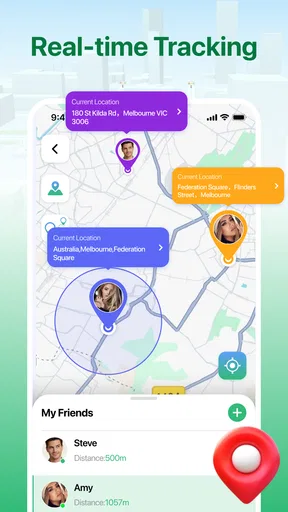
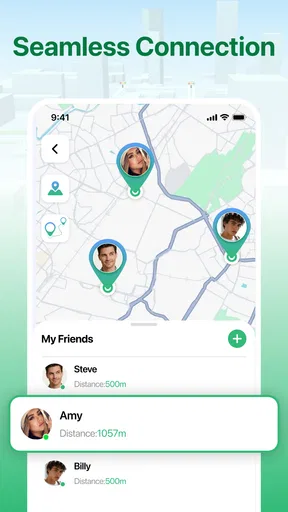
Once you're in, the app offers a clean and straightforward interface. It’s designed so that even the least tech-savvy among us can find their way around without any trouble. The home screen displays a map with real-time locations of your contacts who are sharing their location with you. I found this feature particularly handy during a recent outing with friends—I could see exactly where everyone was without having to send a dozen "where are you?" texts.
Features that Stand Out
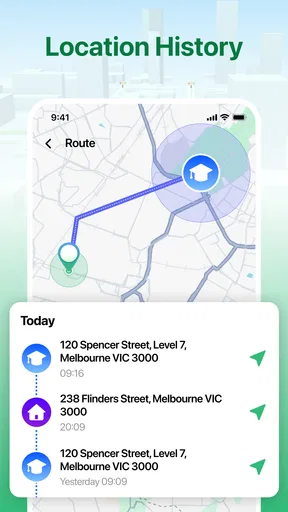
One of the standout features of this app is its real-time tracking capability. The app updates locations very swiftly, so you're never behind on where your loved ones are. It also has a handy history feature that lets you look back at the routes taken by each of your contacts over the past few days. This is great for those times when you need to backtrack a journey or simply satisfy your curiosity.
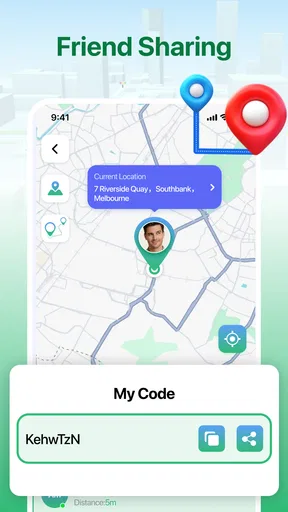
If you're worried about privacy, the app has you covered. There's a feature that allows you to choose who can see your location and when. You can easily toggle location sharing on or off, or set it to share your location only during specific times. This gives you peace of mind, knowing you have control over your privacy.
Usability and Performance
Performance-wise, the app does not disappoint. The app runs smoothly without any noticeable lag, even when tracking multiple contacts at once. I tested it both on Wi-Fi and mobile data, and it worked seamlessly in both scenarios.
Battery usage is another concern when it comes to GPS apps. But this app is surprisingly efficient. It didn’t drain my battery as much as I expected, which is a huge plus for anyone who relies on their phone throughout the day.
Why You Might Want to Try It
If you’re often coordinating meet-ups with friends or family, this app can save you a lot of hassle. It’s also a useful tool for parents who want to keep an eye on their kids’ whereabouts. The real-time updates mean you’re always in the loop, which is reassuring in today’s fast-paced world.
Moreover, if you're the adventurous type, you might find the location history feature fun and useful. You can track your own travels and share them with others, which can be quite the conversation starter!
A Few Final Thoughts
Overall, GPS Tracker & Location Tracker is a solid app that does exactly what it promises. It’s user-friendly, reliable, and packed with features that make it more than just a simple tracking tool. Whether you’re using it for safety, convenience, or just out of curiosity, it’s definitely worth a try.
So, if you're looking to keep tabs on your loved ones (or let them keep tabs on you), give this app a whirl. You might just find it becomes one of your go-to tools in your daily life!
Choosing it over familiar alternatives
Compared with texting arrival updates, a shared map can spare a group from repeated messages when several people are travelling to the same place. Compared with a standard navigation app, its emphasis is on seeing participating contacts rather than planning a route for yourself. Those are different jobs, so I would not replace a directions app with this one for a long drive, or expect ordinary messaging to offer the same at-a-glance view.
The route history also changes how I would use it: it can be useful for retracing a recent trip, but it is not a substitute for a deliberate travel log or a record you should depend on for important documentation. If all you need is to tell a friend “I’ve arrived,” a message is lighter and creates less ongoing visibility. The practical advantage here appears when a group has a repeated coordination need and agrees that a shared map is worth keeping available.
Small habits that make the map more useful
For a first outing, I would ask each person to check that they are sharing with the intended contacts before anyone relies on the map. Then choose one concrete test, such as meeting at a busy entrance, and use the location view only to solve that problem. This reveals whether the group understands the interface and whether seeing locations actually reduces confusion. It is a better trial than switching on sharing indefinitely and hoping everyone finds it helpful.
When reviewing a route, use it as context rather than a verdict. A recorded path may help someone remember which streets they took, but it cannot explain why they stopped or whether the device was with them throughout. That distinction is especially important in households: asking “Was the route confusing?” is more constructive than treating a past path as evidence of what a person did.
Another sensible trade-off is to reserve location sharing for plans that benefit from it. A day trip with several meeting points may justify opening the map; a routine where everyone already knows the schedule may not. This keeps the app from becoming another screen people feel obliged to check and makes it easier to notice when the feature genuinely saves time.
Practical expectations before installing
The app is free and its content rating is Everyone. It is currently version 1.2.0, with a minimum operating system requirement of 7.0, so compatibility is worth checking on the particular device before a household makes it part of a routine. Because each person’s phone and account form part of the arrangement, everyone who needs to appear on the map should understand the setup rather than assuming one installation will automatically cover a whole family.
A few reasonable questions are worth settling before use. Who will be able to see each person’s location? When will sharing be turned off? What should the group do if a marker appears stale or a phone is unavailable? Agreeing on those points ahead of time avoids treating the app as an unquestioned safety system. If a person does not want to share, that preference should be respected; use a call, message, or agreed meeting point instead.
My household verdict
For a household that already trusts one another and wants an easier way to coordinate pickups or meet-ups, I think this app is worth trying as a convenience tool. Its map and location-history approach gives it a different role from ordinary chat, while the ability to choose who sees a location and when supports more deliberate use. The best results come from keeping the group small, agreeing on the purpose, and having a communication fallback.
I would skip it if the goal is covert monitoring, if a family expects a map to guarantee someone’s safety, or if nobody wants the extra responsibility of managing shared access. A navigation app, a quick message, or a planned meeting point can be the better choice depending on the task. Used openly and for a clear reason, though, GPS Tracker & Location Tracker can make everyday coordination feel less like a chain of check-in texts and more like a simple shared plan.
Pros
- Accurate real-time location tracking.
- User-friendly interface with easy navigation.
- Battery-efficient GPS technology.
- Comprehensive location history logs.
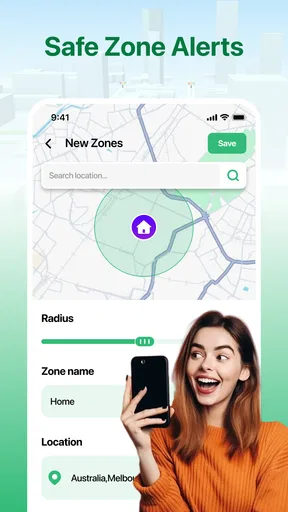
- Customizable alerts for geofencing.
Cons
- Requires constant internet connection.
- Privacy concerns with data sharing.
- Limited offline functionality.
- Frequent ads in the free version.
- Some features behind a paywall.
FAQs for GPS Tracker & Location Tracker
How accurate is the GPS Tracker & Location Tracker?
The GPS Tracker & Location Tracker app provides high accuracy by using a combination of GPS, Wi-Fi, and cellular networks. However, the precision may vary depending on environmental factors such as signal obstruction by buildings or weather conditions. It typically offers location accuracy within a few meters under optimal conditions.
Does the app consume a lot of battery power?
While GPS-based apps can be battery-intensive, the GPS Tracker & Location Tracker app is optimized for efficiency. It uses smart algorithms to minimize battery usage by activating GPS only when necessary. Users can also adjust settings to balance between accuracy and battery conservation based on their needs.
Is my location data secure with this app?
Yes, the app prioritizes user privacy and security. All location data is encrypted and stored securely. Users have control over who can access their location information, and the app complies with major privacy regulations to ensure data protection. Always check the app's privacy settings for customization.
Can I use the app without an internet connection?
The GPS Tracker & Location Tracker app requires an internet connection for real-time location sharing and updates. However, it can still track and store location data offline, which will be uploaded once the device reconnects to the internet. This ensures continuous tracking even in areas with poor connectivity.
Is the app compatible with all devices?
The app is designed to be compatible with most Android and iOS devices. It requires a minimum operating system version, which can be checked on the app's download page. Regular updates ensure compatibility with newer devices and operating systems, but users should confirm their device meets the necessary requirements.


